
Vectorization in Python: The End of Loops for Large-Scale Data Processing
Discover how replacing traditional loops with vectorized operations can accelerate your Python code by 100-1000x when working with massive datasets.

The Vectorization Revolution: Parallel vs Sequential Processing
Vectorization represents one of the most significant performance optimizations in modern data science. At its core, it's about replacing sequential element-by-element operations with parallel array processing, leveraging optimized low-level libraries (primarily written in C and Fortran) that process entire datasets simultaneously.
Traditional Loop Processing
- Execution: Sequential, one element at a time
- Overhead: Python interpreter overhead per iteration
- Memory: Frequent cache misses
- Speed: O(N) with high constant factors
Vectorized Processing
- Execution: Parallel, all elements simultaneously
- Overhead: Single optimized C/Fortran function call
- Memory: Cache-friendly contiguous operations
- Speed: O(N) with minimal constant factors
Why Vectorization is Faster:
- SIMD Instructions: Modern CPUs support Single Instruction, Multiple Data operations
- Reduced Python Overhead: One function call instead of N interpreter operations
- Memory Locality: Contiguous array operations are cache-optimized
- Parallel Hardware: Leverages multiple CPU cores and vector registers
Benchmark 1: Summing 1.5 Million Numbers
Let's start with a fundamental operation: summing a sequence of numbers. This demonstrates the most basic vectorization principle.
Traditional Loop Approach
import time

start = time.time()
total = 0

# Iterating through 1.5 million numbers
for item in range(0, 1500000):
    total = total + item

print(f'Sum: {total}')
end = time.time()
print(f'Time: {end - start:.3f} seconds')
# Output: 1124999250000
# Time: 0.140 seconds
Performance Issues:
- 1.5 million Python interpreter iterations
- Type checking and boxing/unboxing each iteration
- Function call overhead for each addition
- Poor cache utilization
Vectorized NumPy Approach
import numpy as np
import time

start = time.time()

# Vectorized sum in single operation
result = np.sum(np.arange(1500000))

print(f'Sum: {result}')
end = time.time()
print(f'Time: {end - start:.3f} seconds')
# Output: 1124999250000
# Time: 0.008 seconds
Performance Advantages:
- Single C-level function call
- Contiguous memory operations
- SIMD CPU instructions
- Minimal Python interpreter overhead
Performance Improvement: 18x Faster
This basic example shows vectorization delivering an 18x speed improvement. The gap widens dramatically with more complex operations and larger datasets.
Benchmark 2: DataFrame Mathematical Operations
Creating the Test Dataset
import numpy as np
import pandas as pd

# Create DataFrame with 5 million rows, 4 columns
# Values are random integers between 0 and 50
df = pd.DataFrame(
    np.random.randint(0, 50, size=(5000000, 4)),
    columns=('a', 'b', 'c', 'd')
)

print(f'DataFrame shape: {df.shape}')
print(df.head())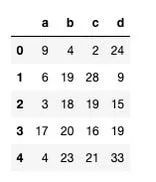
Task: Create Ratio Column (d ÷ c × 100)
Loop Approach: DataFrame.iterrows()
import time

start = time.time()

# Iterating through DataFrame using iterrows
for idx, row in df.iterrows():
    # Calculate ratio for each row individually
    df.at[idx, 'ratio'] = 100 * (row["d"] / row["c"])

end = time.time()
print(f'Time: {end - start:.2f} seconds')
# Time: 109.00 secondsiterrows()creates Series objects for each rowdf.at[]has significant overhead per cell- 5 million Python object creations
- Row-by-row division and multiplication
Vectorized Approach: Column Operations
import time

start = time.time()

# Vectorized operation on entire columns
df["ratio"] = 100 * (df["d"] / df["c"])

end = time.time()
print(f'Time: {end - start:.3f} seconds')
# Time: 0.120 seconds- Single operation on entire columns
- NumPy array operations underneath
- Memory-efficient contiguous processing
- Automatic handling of NaN/inf values
Performance Improvement: 908x Faster
This demonstrates why vectorization is non-negotiable for DataFrame operations. The 900x speed difference transforms what would be minutes of waiting into instant results.
Benchmark 3: Conditional Logic with Vectorization
The Conditional Column Challenge
Create column 'e' based on conditions in column 'a':
- If
a == 0:e = d - If
0 < a ≤ 25:e = b - c - Otherwise:
e = b + c
Loop with Conditional Logic
import time

start = time.time()

for idx, row in df.iterrows():
    if row.a == 0:
        df.at[idx, 'e'] = row.d
    elif (row.a <= 25) & (row.a > 0):
        df.at[idx, 'e'] = row.b - row.c
    else:
        df.at[idx, 'e'] = row.b + row.c

end = time.time()
print(f'Time: {end - start:.2f} seconds')
# Time: 177.00 seconds
Vectorized Conditional Logic
import time

start = time.time()

# Start with default case
df['e'] = df['b'] + df['c']

# Apply conditions using vectorized indexing
df.loc[df['a'] <= 25, 'e'] = df['b'] - df['c']
df.loc[df['a'] == 0, 'e'] = df['d']

end = time.time()
print(f'Time: {end - start:.3f} seconds')
# Time: 0.280 seconds
The Vectorized Conditional Pattern:
# Pattern: Start with default, then apply conditions
df['result'] = default_value                    # Default case
df.loc[condition1, 'result'] = value1          # Condition 1
df.loc[condition2, 'result'] = value2          # Condition 2
# ... additional conditions as needed- Avoids nested if-else logic: Clear, sequential conditions
- Maintains vectorization: Each condition processes entire subsets
- Readable and maintainable: Conditions are explicit and separate
- Optimized execution: Pandas optimizes sequential .loc operations
Performance Improvement: 632x Faster
Conditional logic shows even greater benefits from vectorization, transforming nearly 3 minutes of processing into under 300 milliseconds.
Benchmark 4: Machine Learning Operations
The Linear Regression Computation
For a simple linear regression prediction: y = m₁x₁ + m₂x₂ + m₃x₃ + m₄x₄ + m₅x₅
We need to compute this for 5 million data points with 5 features each.
Nested Loop Computation
import numpy as np
import time

# Model parameters and input data
m = np.random.rand(1, 5)            # 1×5 parameter vector
x = np.random.rand(5000000, 5)      # 5M×5 feature matrix
y = np.zeros(5000000)               # Output vector

tic = time.process_time()

# Nested loops for dot product
for i in range(5000000):
    total = 0
    for j in range(5):
        total += x[i][j] * m[0][j]
    y[i] = total

toc = time.process_time()
print(f"Time: {toc - tic:.3f} seconds")
# Time: 28.228 seconds
Vectorized Matrix Multiplication
import numpy as np
import time

# Same data setup
m = np.random.rand(1, 5)
x = np.random.rand(5000000, 5)

tic = time.process_time()

# Single vectorized operation
y = np.dot(x, m.T)  # or x @ m.T in Python 3.5+

toc = time.process_time()
print(f"Time: {toc - tic:.3f} seconds")
# Time: 0.107 seconds
Why NumPy.dot is So Fast:
NumPy delegates to optimized linear algebra libraries (OpenBLAS, MKL, ATLAS) that use:
- CPU-specific SIMD instructions (AVX, SSE)
- Multi-threaded parallel processing
- Cache-optimized memory access patterns
# Memory access patterns:
Loop approach:     x[0][0], x[0][1], x[0][2]...  # Poor locality
Vectorized: x[0:block][0:block] # Contiguous blocksOne C function call vs. 25 million Python operations (5M rows × 5 features)
Performance Improvement: 264x Faster
For machine learning operations, vectorization isn't just an optimization it's a requirement. The difference between 28 seconds and 0.1 seconds enables interactive model development.
The Vectorization Toolkit: Essential Patterns
1. Universal Functions (ufuncs)
# Instead of:
result = []
for x in array:
    result.append(math.sin(x))

# Use NumPy ufunc:
result = np.sin(array)  # 50-100x faster
Available ufuncs: np.sin, np.exp, np.log, np.sqrt, all arithmetic operators
2. Aggregation Operations
# Instead of:
total = 0
for x in data:
    total += x

# Use vectorized aggregation:
total = np.sum(data)      # sum
mean = np.mean(data)      # mean
std = np.std(data)        # standard deviation
Key insight: These operations have O(N) complexity but 100x smaller constant factors.
3. Boolean Masking
# Instead of:
filtered = []
for x in data:
    if condition(x):
        filtered.append(x)

# Use boolean indexing:
mask = data > threshold
filtered = data[mask]
Advanced: Combine masks with & (and), | (or), ~ (not)
4. Broadcasting
# Instead of:
for i in range(n):
    result[i] = array[i] + scalar

# Use broadcasting:
result = array + scalar  # Works for arrays of any dimension
Rule: Dimensions are aligned from the right, and missing dimensions are treated as size 1.
When NOT to Use Vectorization
1. Small Datasets
For datasets smaller than ~1,000 elements, the overhead of importing NumPy/Pandas and converting to arrays may outweigh benefits.
Guideline:
Use vectorization when N > 1000 or when operations are complex enough to justify setup time.
2. Complex Conditional Logic
When conditions involve complex function calls or external dependencies that can't be vectorized.
Alternative:
Use numba or numpy.vectorize() (with caution) for complex element-wise operations.
3. Memory Constraints
Vectorized operations often create intermediate arrays. If memory is tight, loops may be more memory-efficient.
Solution:
Use generator expressions or chunk processing for out-of-memory datasets.
Migrating from Loops to Vectorization
Step 1: Identify Loop Patterns
Common patterns that can be vectorized:
- Element-wise operations:
for x in data: result.append(f(x)) - Aggregations:
for x in data: total += x - Conditional transformations: Nested if-else in loops
- Matrix operations: Nested loops for dot products
Step 2: Convert to NumPy/Pandas
Ensure data is in vectorizable format:
# Convert to NumPy array
list_data = [1, 2, 3, 4, 5]
array_data = np.array(list_data)  # Now vectorizable

# Ensure DataFrame columns are appropriate dtypes
df['column'] = df['column'].astype(np.float32)  # Faster than float64
Step 3: Apply Vectorized Operations
Replace loop logic with vectorized equivalents:
result = []
for x in data:
    if x > 0:
        result.append(x * 2)
    else:
result.append(x / 2)result = np.where(data > 0, data * 2, data / 2)Step 4: Profile and Optimize
Use profiling to identify remaining bottlenecks:
import timeit

# Time vectorized version
vectorized_time = timeit.timeit(
    "np.sum(data)",
    setup="import numpy as np; data=np.random.rand(1000000)",
    number=100
)

# Compare with loop version (if necessary)
loop_time = timeit.timeit(
    "sum(x for x in data)",
    setup="import numpy as np; data=list(np.random.rand(1000000))",
    number=100
)

print(f"Vectorized: {vectorized_time:.3f}s, Loop: {loop_time:.3f}s")
The Vectorization Mindset Shift
Think in Arrays, Not Elements
Instead of asking "what happens to this element?", ask "what operation applies to the entire array?"
Embrace Batch Processing
Design algorithms that process entire datasets in single operations, not row-by-row.
Learn the Vectorized Vocabulary
Master key NumPy/Pandas functions: np.where(), df.loc[], np.dot(), broadcasting, ufuncs.
Summary of Performance Gains:
| Operation | Loop Time | Vectorized Time | Speedup |
|---|---|---|---|
| Sum 1.5M Numbers | 0.140s | 0.008s | 18× |
| DataFrame Ratio | 109.0s | 0.120s | 908× |
| Conditional Logic | 177.0s | 0.280s | 632× |
| ML Dot Product | 28.23s | 0.107s | 264× |
Vectorization isn't just a performance optimization it's a different way of thinking about data processing. The most significant benefit isn't just the speed improvement (which is substantial), but the mental model shift from sequential to parallel thinking. This mindset serves you well not just in Python, but in understanding modern computing architecture, parallel processing, and efficient algorithm design.